Set up a smart plug for the minutes after an outage
Check power recovery and local operation before trusting an automation with everyday routines.
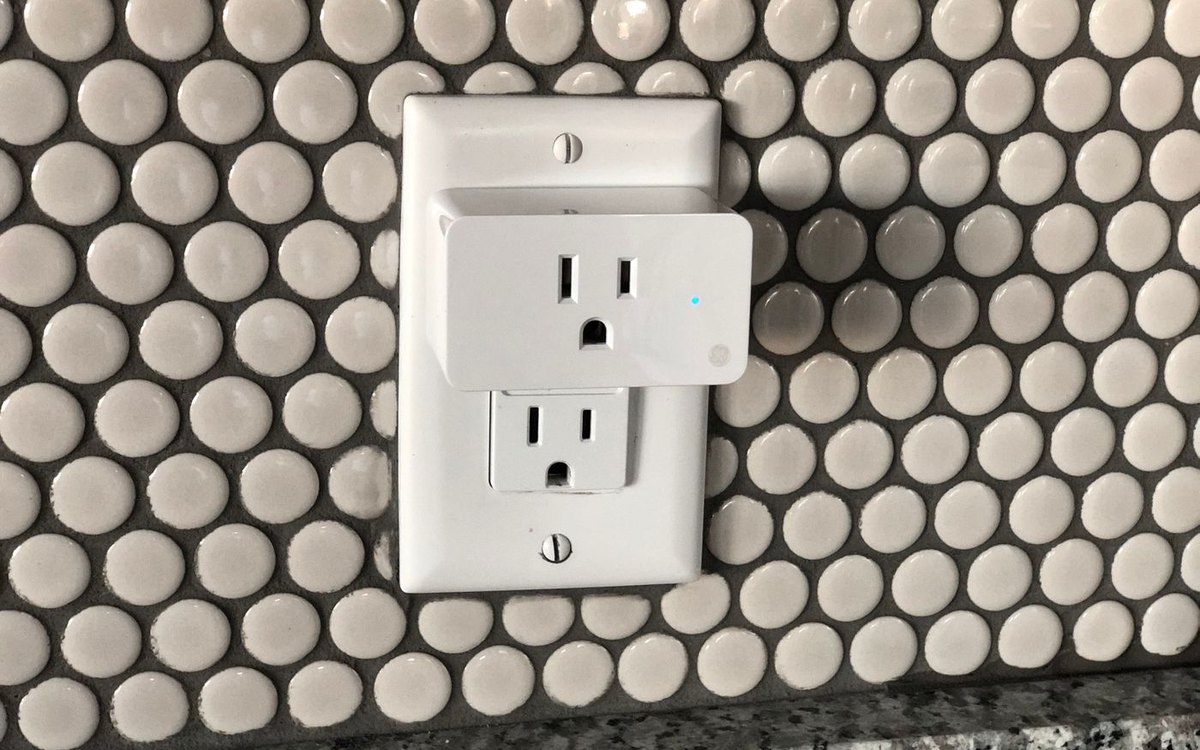
A smart plug may resume its previous output state, turn on or stay off when the power returns. The default matters when a lamp is in a bedroom or an automation is meant to run before anyone is awake. Find the restoration setting in the device documentation and choose the behavior appropriate to the equipment. Test with an ordinary lamp that the plug is rated to handle.
Picture a short neighborhood outage just after midnight. The kitchen router takes a few minutes to return and the bedside lamp is connected to a socket that remembers its last state. An outdoor schedule is managed separately by a home hub. When the lights come back, those devices may be following three different rules. Preparing for that moment starts with one question for each accessory: what does the person in the room expect to happen when power returns?
Find the state the manufacturer lets you choose
Look up the exact plug model and hardware revision. Its manual should identify whether a startup preference is available and where to find it. The Tapo app guide for compatible plugs, for example, documents settings to restore the previous state, turn on at startup or stay off. Read the instructions for your model and check the interaction with any active schedule. Firmware, region and product generation can affect the options. If the setting is absent, consult the official support information instead of choosing the behavior by analogy with a different model.
The lamp has a second set of controls. A conventional lamp with its own switch left on may light whenever the plug supplies power. A touch-controlled lamp may start in standby or have its own power restoration preference. Test the same lamp directly from its normal outlet first if that is appropriate for the device. This tells you what the lamp itself does when power is supplied. Put the lamp back into the smart-plug setup and compare. If you interpret a built-in standby feature as a network failure, you can spend an afternoon adjusting the wrong device.
Pick a state to fit the room. A light that resumes its previous state can make sense in a room where occupants expect it to continue. A decorative lamp near a bed may be better left off after a long outage. Check the time of day and whether someone who needs access to the physical control can reach it. Keep household safety equipment and essential services on the supported arrangements specified by their manufacturers. Limit the testing in this article to a simple, suitable lamp. Any uncertainty about appliance load, outlet condition or installation belongs with a qualified professional.
Separate power, network and schedule
Turn off the lamp schedule temporarily while testing. Follow the supported procedure to disconnect and reconnect the plug. Observe what the lamp does as power returns without immediately reaching for the phone. Give the device time to rejoin the usual network. Record the lamp’s actual state, the plug’s indicator and the app’s state after it reconnects. A tap in the application tests remote control after startup. It says little about whether the lamp was lit before the router came back online.
Run the network-only comparison separately if the manufacturer documents local operation. Keep the plug powered and use the ordinary supported way to make the external connection unavailable without disturbing other necessary household services. Test from the usual local controller. A command may depend on the home wireless network or require a remote application service. A device can be working normally through its physical button while a remote control remains unavailable. Information in the app can also represent the last state it received. Look at the lamp when comparing the two.
The final comparison is the schedule. Restore the usual schedule after the first checks and choose a controlled time to observe the next event. Consult the manual if a missed event coincides with a restart. One system can compute the expected state once its clock is available, while another waits for the next programmed transition. A cloud routine could behave differently from a schedule stored in the device. Check results with ordinary daylight timing before depending on an unattended schedule. Keep the arrangement simple enough to repeat after a firmware update.
Write down the ownership of each rule
Many households have one automation in the device app and another in the platform that controls the room. Either one can issue a command while the other shows a different schedule. Inspect both places before changing the default state a second time. Write down “device startup state” in one column and “active schedule” in another. Add the name of the controller if a broader routine includes the lamp. Checking one lamp and one trigger makes unexpected behavior easier to reproduce. Multiple scenes changing at once can hide where a command originated.
If a lamp turns on for a few moments and then turns off, note the timing. A plug can assume its startup state before a controller sends a different instruction. If the lamp switches again later when the clock synchronizes, the schedule may be reasserting its intended state. Consult the application’s event history if it exposes one and if it belongs to your own home setup. Compare the time on the record with what people in the room saw. A useful note could say that the physical lamp turned on immediately and that a home routine changed it two minutes later. Those are separate events worth understanding.
If the same lamp belongs to a morning scene and a vacation scene, decide which of them can reasonably run while people are at home. Name the schedules after their jobs. Use a supported pause or disable function when you want an intentional exception. If you test near bedtime, return the lamp to its expected arrangement before leaving the room. A controlled test should end with the household using the setup it meant to have.
Compare a short interruption with a normal cold start
If the manual supports an ordinary cold start, allow the equipment to settle fully before comparing a later run. A smart plug that reconnects to an already operating router is doing a smaller job than one that starts while the router is still unavailable. Think about which one you are measuring. Check the result against the documented startup time and leave the access settings as they were. When the router is restarted as part of routine maintenance, observe the light, the network status and the controller at their normal times. Keeping those observations together helps identify which part became ready first.
For a room where the lamp matters in the early morning, write the expected result in one sentence and show it to the person who uses it. There may be a good reason to leave the outlet available manually until the regular schedule resumes. If the intended behavior depends on awareness of local time, verify the time shown by the controlling application after an ordinary restart. When daylight saving rules change in your location, check a noncritical scheduled event and compare the displayed schedule with the outcome. Keep your record focused on a condition the household can observe, so a later report of an unexpected lamp state gives you a useful place to begin.
Leave a manual route someone can use
Show residents the plug’s physical button if its manufacturer provides one and the control can be reached safely. Explain how it interacts with the attached lamp’s own switch. If reaching behind a large piece of furniture is difficult, choose another supported location or use a simpler lamp arrangement. For changes that require moving an accessory, consult the safety and ventilation guidance. A single clear way to reach the hardware is worth more than a voice command nobody remembers.
Ask one other person in the home to turn the lamp on and off using the ordinary fallback. Listen to the words they use for the room and the plug, and use those names in any shared control screen. A family member recovering from a short outage should be able to identify why the remote control is unavailable and what still works. Avoid saving account secrets on a label. A small note can name the device, the physical action and where the normal support information is kept.
Recheck during normal maintenance
After a significant change to the network, schedule or bulb, run the brief startup test again under ordinary conditions. Save the original default and the result that worked. If something breaks after an update, those notes make it possible to restore a known arrangement or describe the difference to the manufacturer. People often remember the button they pressed, while the state of the lamp just before power returned is what makes the comparison useful.
Expand the setup one accessory at a time. A familiar plug may support the same model controls on a second unit, but the room and attached device still matter. Observe the first scheduled event and the first restart before relying on a new arrangement. Where predictable recovery is hard to achieve, a plain physical control can be the most straightforward choice. A smart plug earns its place when the household can anticipate what it will do during the busy minutes when everything powers back up.